Locking

Tag: locking

Lost Updates Under Read Committed Snapshot Isolation (RCSI)

Lost Updates Under Read Committed Snapshot Isolation (RCSI)

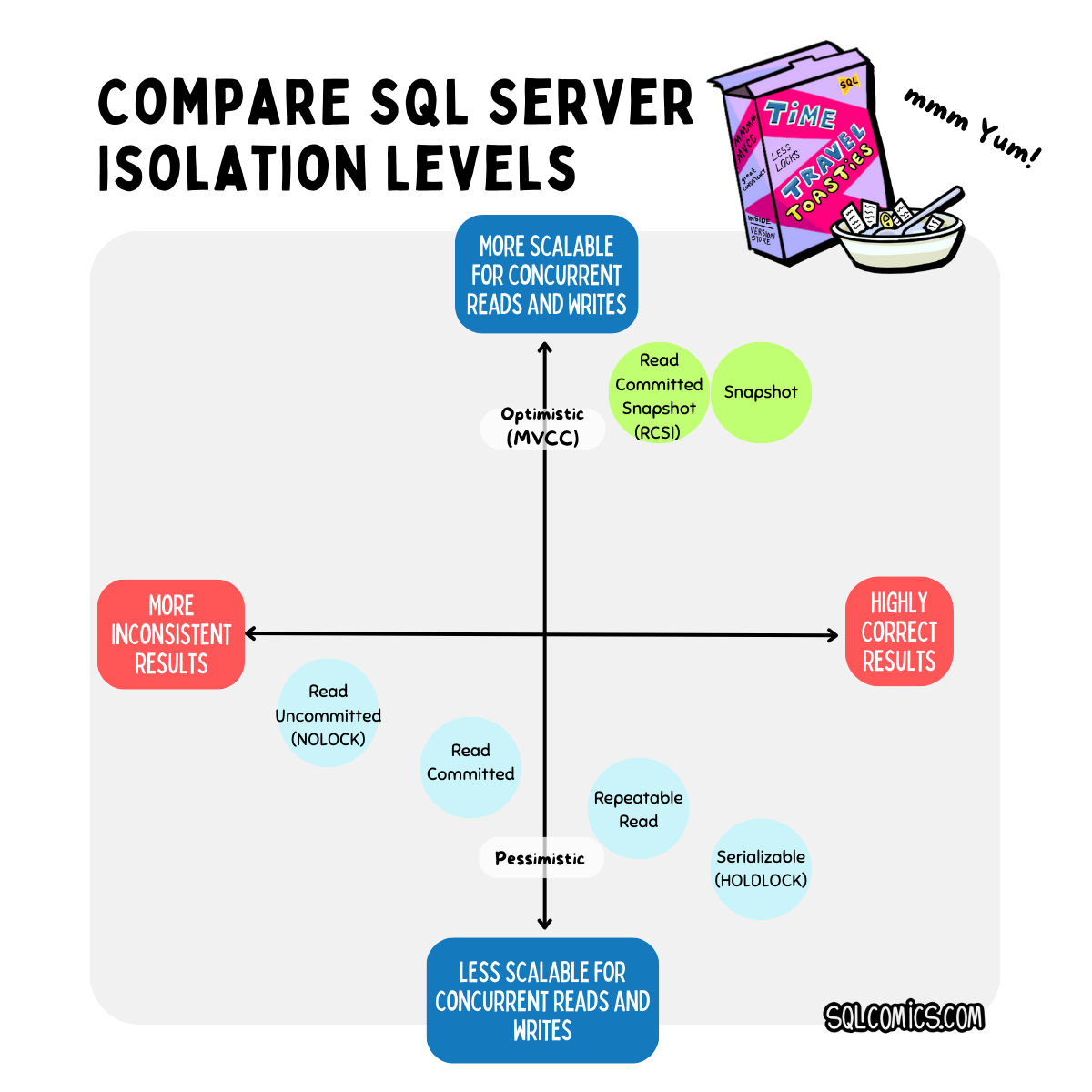
I shared an image on social media this week that describes how I feel about isolation levels in SQL Server (and its various flavors): the more concurrent sessions you have in a database reading and writing data at the same time, the more attractive it is to use version-based optimistic locking for scalability reasons.

There are two isolation levels in SQL Server that use optimistic locking for disk-based tables:

  1. Read Committed Snapshot Isolation (RCSI), which changes the implementation of the default Read Committed Isolation level and enables statement-based consistency.
  2. Snapshot Isolation, which provides high consistency for transactions (which often contain multiple statements). Snapshot Isolation also provides support for identifying update conflicts.

Many folks get pretty nervous about RCSI when they learn that certain timing effects can happen with data modifications that don’t happen under Read Committed. The irony is that RCSI does solve many OTHER timing risks in Read Committed, and overall is more consistent, so sticking with the pessimistic implementation of Read Committed is not a great solution, either.

Continue reading

Jer and Kendar Explore Optimized Locking

Jer and Kendar Explore Optimized Locking

πŸ”₯ UPDATE (November 2025): Microsoft has introduced optimized locking v2 with significant improvements. The new version includes Skip Index Locks (SIL) and Query Plan LAQ Feedback Persistence, which further reduce lock overhead. The improvements are most pronounced for nonclustered indexes. Optimized locking v2 is available in SQL Server 2025 and Azure SQL.

SQL Server has a new feature that’s currently only available in Azure SQL Database: Optimized Locking.

Jeremiah Peschka joins Kendra (aka Kendar) to talk through the docs and nerd out on locks, blocks, and how to pronounce the acronym “LAQ”.

Prefer to explore optimized locking with a diagram? I’ve also got a little sketchnote for ya.

Continue reading

Error 1204: When SQL Server Runs Out of Locks

Error 1204: When SQL Server Runs Out of Locks

I recently did a Dear SQL DBA episode answering a question about lock timeouts and memory in SQL Server. I really enjoyed the episode, andΒ thought it would be fun to follow up and show what it looks like if SQL Server doesn’t have enough memory to allocate locks.

Continue reading

Why You Should Switch in Staging Tables Instead of Renaming Them (Dear SQL DBA Episode 26)

Why You Should Switch in Staging Tables Instead of Renaming Them (Dear SQL DBA Episode 26)

Over the years, I’ve come across a pattern fairly frequently: an application in an OLTP database periodically creates new tables, loads some data into them and fixes it up, then does a switcheroo and replaces old tables with the new tables.

This can cause major problems with blocking if anyone else is querying the table.

Continue reading

Decoding Key and Page WaitResource for Deadlocks and Blocking

Decoding Key and Page WaitResource for Deadlocks and Blocking

If you use SQL Server’s blocked process report or collect deadlock graphs, occasionally you’ll come across things that look like this:

waitresource=“PAGE: 6:3:70133 " waitresource=“KEY: 6:72057594041991168 (ce52f92a058c)”

Continue reading

Setting up Free Blocking Alerts and Deadlock Monitoring (Dear SQL DBA Episode 17)

Setting up Free Blocking Alerts and Deadlock Monitoring (Dear SQL DBA Episode 17)

What tools in SQL Server will notify you about blocking and help track the queries behind your toughest blocking and deadlocking problems?

Continue reading

Deadlock Code for the WideWorldImporters Sample Database

Deadlock Code for the WideWorldImporters Sample Database

If you haven’t checked out Microsoft’s new WideWorldImporters sample database for 2016, it’s a pretty cool new little database. The database makes it easy to play around with new 2016 features, and it even ships with some cool little executables to run inserts in the “workload-drivers” folder.

Continue reading