How to See Rowcounts and Execution Time for In-Flight Queries in SQL Server
I frequently need to see rowcounts and execution time for queries while they’re running. Maybe I’m troubleshooting a slow query …
Read MoreBy Kendra Little on • 7 min read
Shrinking databases in SQL Server isn’t fun – it’s slow, it causes blocking if you forget to use the WAIT_AT_LOW_PRIORITY option, and sometimes it persistently fails and refuses to budge until you restart the instance. You only want to shrink a SQL Server database when you’ve got a good reason and a lot of patience.
If you’re using Azure SQL Managed Instance and you haven’t already used data compression on your indexes and shrunk your databases, you probably have two good reasons to do both of those things: performance and cost reduction.
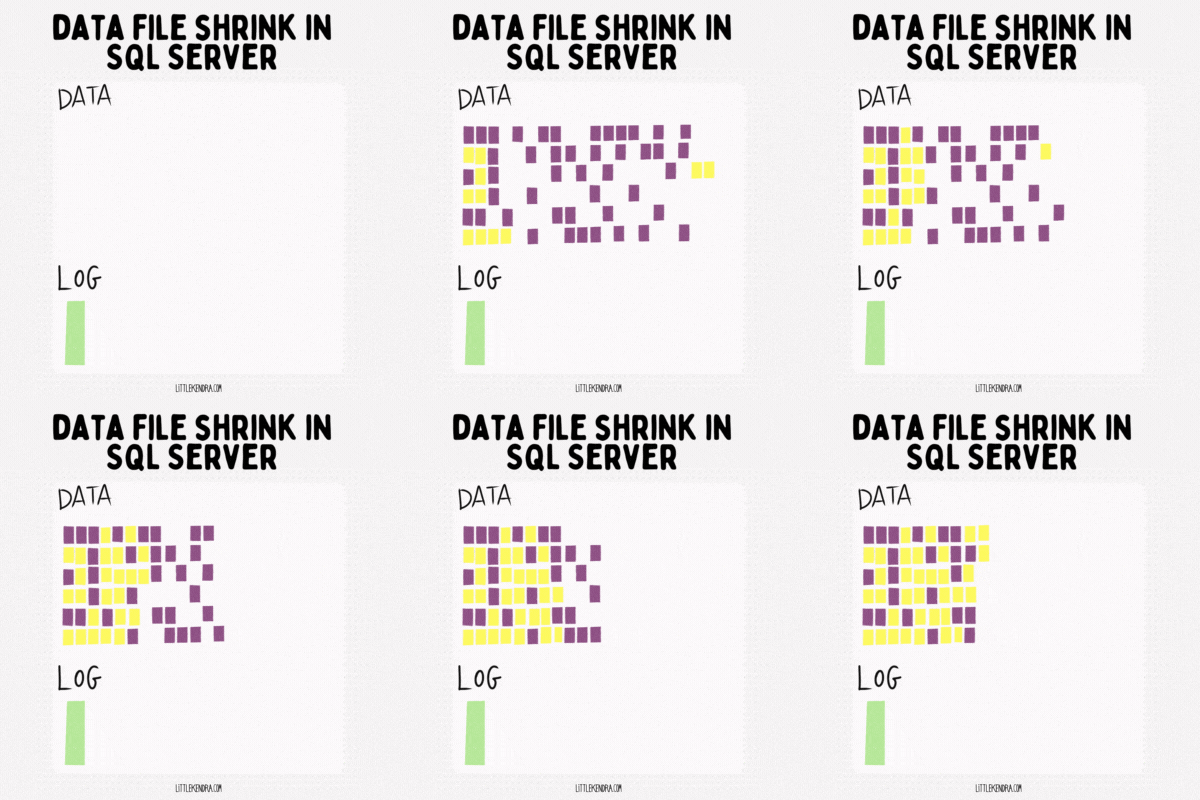
Compressing indexes reduces the amount of data pages that indexes take up in storage. That reduces the amount of physical reads your queries do to pull that data into memory. That’s terrific, but it’s only half the benefit: compressing those data pages helps you fit more data into memory at a given time, which further reduces physical IO. Physical IO is your enemy in the video game that is administering Managed Instance.
You don’t get a ton of memory per vCore with Managed Instance:
All of these amounts of RAM make me sad. That memory-optimized option doesn’t seem very memory-optimized to me. But the lower options are basically anti-patterns. To make a SQL Server workload perform well, you want to make sure you can keep frequently accessed data in cache. This is especially true when you have slow storage, which is the case with Managed Instance.
Yes, the storage is faster on the Business Critical tier, but at a huge cost— and even then, it ain’t all that fast and your writes will get gated by waits due to synchronous replicas.
If you can use a combination of compression, data pruning, and index tuning to make the General Purpose tier work for you, you will get a lot more value out of the service, without the synchronous commit waits. But you may have to shrink your databases, too, because…
My least favorite thing about Managed Instance is that the amount of storage you need on an instance can dictate the number of vCores you must allocate. This can really drive up your monthly costs if you have a significant amount of data that is not read often– and that’s the case for most databases that have been around for longer than a year or two.
Here are some storage limits based on vCores. These limits are for total space used across all system and user databases – including tempdb. The prices listed are at pay-as-you-go rates as of today in the East US region if you are using “memory-optimized” hardware:
General Purpose:
Business Critical:
General Purpose V1 is very odd: throughput for your files is determined by their size.
You never want to shrink your files too far, just to end up in a cycle of constant shrinking and growing. But you also don’t accidentally dip under some of these IOPS thresholds.
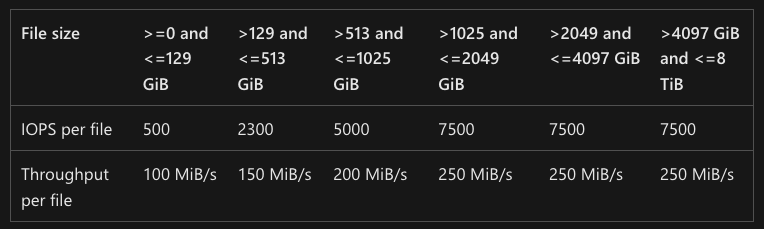
There is an additional limitation of “Max 120 MiB/s per instance” for transaction log files under GPV1, and I can confirm that I haven’t seen much of a difference in performance between a 130GB log file and a 514GB log file. (I haven’t been all that scientific about it, though.)
Thankfully, this whole “IOPS based on file size” thing is going away in General Purpose V2 (in Public Preview at this time). But it will always be useful to stay fresh on what limitations apply to your configuration, and what configurations are possible.
With on-prem databases, it’s often not such a big deal to let “maybe someday we will need it” types of data collect in your database, sprawling in non-compressed fields of bytes. The cloud is different. With PAAS databases, it can take a bit of time to understand how the various SKU options impact your costs, and how to get the best deal of them.
To recap, when it comes to Azure SQL Managed Instance, you can get good performance even on General Purpose, but to get there you really need to make your active working set of data fit into memory as much as it possibly can. This list will help you get there:
These steps should at least help you lower that storage slider for some cost savings, but it can often help you fit into a smaller vCore count and save loads of money over time.
While there are many things I want to change about Managed Instance, you can get good value from the service in the right configuration, especially if you work to minimize your costs.
Here are three things I love about Managed Instance:
I’ll expand on these in a future post after I look a bit more at General Purpose V2, which is in public preview.



Copyright (c) 2025, Catalyze SQL, LLC; all rights reserved. Opinions expressed on this site are solely those of Kendra Little of Catalyze SQL, LLC. Content policy: Short excerpts of blog posts (3 sentences) may be republished, but longer excerpts and artwork cannot be shared without explicit permission.