Three Reasons RDS SQL Server Is Better Than Azure SQL Managed Instance
While every managed database service has high points and low points, there are three things that make RDS for SQL Server shine in comparison to Azure …
Read MoreBy Kendra Little on • 4 min read
The Business Critical service tier in Azure SQL Managed Instance is a lot more expensive than General Purpose. For the extra money, you get a different architecture.
Is it worth the extra cost? Spoiler: your mileage will vary, but probably not. Let’s talk about why.
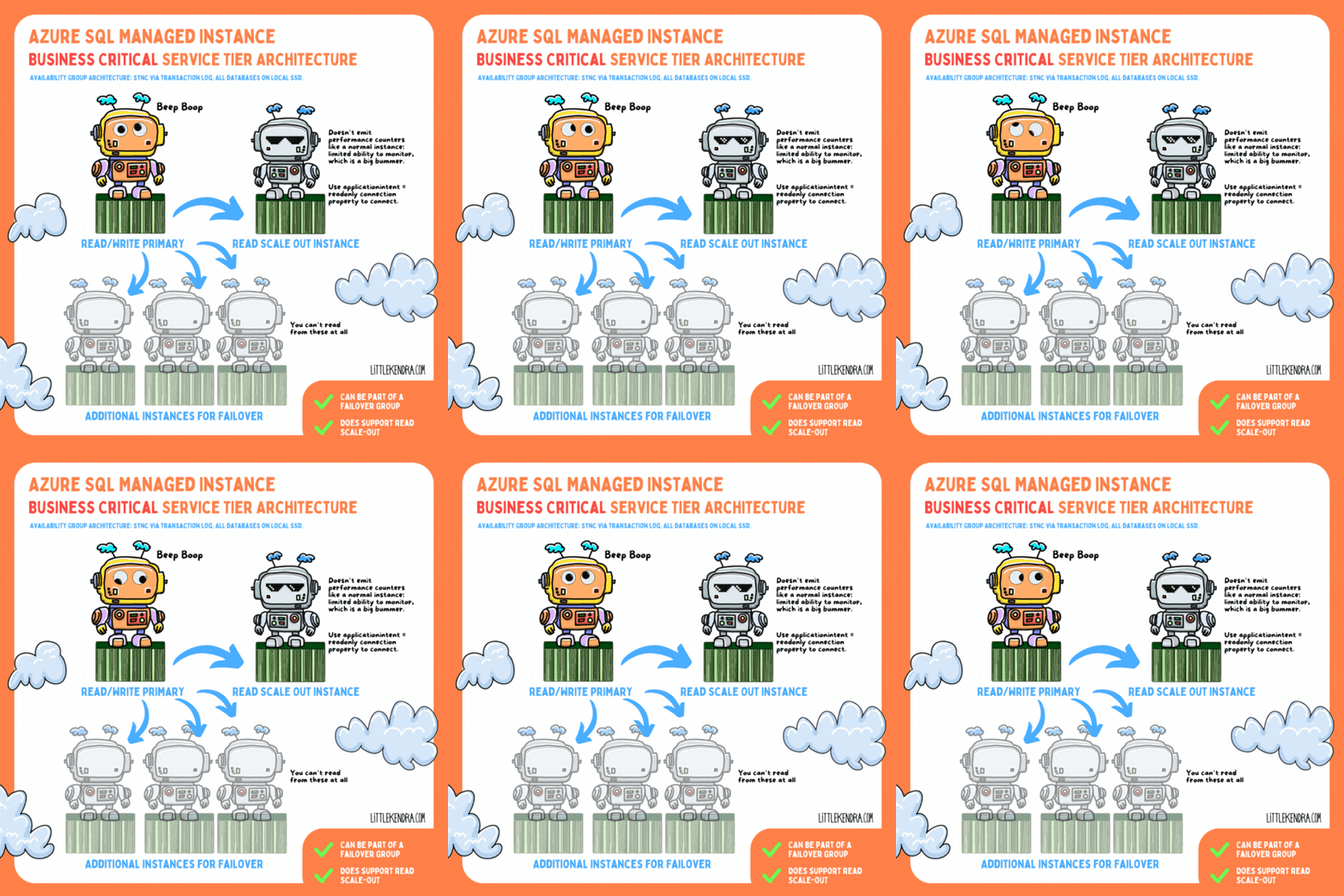
In the Business Critical service tier, all databases are on local SSD on each node (instead of user databases being on blob storage). Data is transferred between nodes via compressed transaction log stream in an Availability Group-ish format. I say ‘Availability Group-ish’ because the tech has clearly been customized quite a bit: it feels like SQL Server and Azure SQL Database had a baby and named it Managed Instance.
As a result of these differences, you can’t see information in the same DMVs as a standard Availability Group.
You get one ‘read scale-out" instance with Business Critical at no extra charge, but it’s… well, it’s limited. It’s so limited that I’m not a huge fan.
While it’s true that this “provides 100% additional compute capacity at no extra charge to off-load read-only operations, such as analytical workloads, from the primary replica” – there’s some fine print.
You don’t get a normal connection string for a read scale-out instance. Instead, you connect to the primary replica with a connection property, ApplicationIntent=ReadOnly. The read scale-out instance doesn’t emit performance counters, either. These limitations mean you are unlikely to be able to connect 3rd party monitoring tools to a read scale-out instance unless the vendor has specifically designed for these limitations. You can query some DMVs.
Maybe there’s some sort of Azure monitoring you can rig up (which probably has a cost), but I can’t find any way to see the health of read scale-out instances in the Azure Portal by default. In fact, I can’t see anything about read scale-out instances in the portal at all. They’re pretty invisible.
As in any Availability Group (ish) scenario, long running queries on the read scale-out instance can block DDL changes from the primary replica. There is an automated process to terminate those to keep things from getting too out of sync. (This is the exact kind of scenario that makes me want robust monitoring so I understand the impact. But…. yeah.)
There are a couple/few failover partners kept on the side for high availability ("up to three secondary replicas (compute and storage) that contain copies of data"), with data synced to these constantly.
I’m not sure if there’s a guaranteed minimum number of replicas (I haven’t seen it documented), but there is clearly some kind of quorum involved/required to keep the primary online.
Here’s a pricing comparison that I collected a week ago when I wrote about the General Purpose Architecture. Using the East-US region as an example and assuming the instance needs to be on all the time for one year (8,760 hours):
| Service Tier | Series | Hourly Rate | Annual Cost |
|---|---|---|---|
| General Purpose (16 vCore) | Standard Series | $4.035/hour | $35,346.60 |
| General Purpose (16 vCore) | Premium Series Memory Optimized | $5.541/hour | $48,539.16 |
| Business Critical (16 vCore) | Standard Series | $10.871/hour | $95,229.96 |
| Business Critical (16 vCore) | Premium Series Memory Optimized | $13.883/hour | $121,615.08 |
For simplicity I listed Standard Series and Memory Optimized at 16vCores– use the pricing calculator if you want to see other options. These pricing examples don’t include Failover Groups— multiply by 2 to estimate that.
On the one hand, the storage in Business Critical is faster than remote blob storage queried over http. (That’s not a high bar.)
But on the other hand, if you modify much data, this is a LOT of nodes to sync to. You can run into HADR waits based on syncing to AG nodes, especially if you have a Business Critical partner in a Failover Group, and this can slow your write workload.
Business Critical might be a better fit for you than General Purpose, depending on your workload, your write patterns, your budget, and your requirements for uptime, but I think in most cases you’ll be better off with the General Purpose service tier using memory-optimized instances to compensate for slow storage speeds, and perhaps a Failover Group to meet HA/DR requirements if you need protection in more than one region. (Yep, you pay extra for a failover partner. But if it’s General Purpose as well, 2 GP instances are still significantly cheaper than 1 BC instance with the pricing above.)
Or maybe your best fit is a different service like Amazon RDS for SQL Server, or a VM solution.



Copyright (c) 2025, Catalyze SQL, LLC; all rights reserved. Opinions expressed on this site are solely those of Kendra Little of Catalyze SQL, LLC. Content policy: Short excerpts of blog posts (3 sentences) may be republished, but longer excerpts and artwork cannot be shared without explicit permission.