Msg 195: STRING_SPLIT Is Not a Recognized Built-In Function Name
Yesterday, I was writing some Transact SQL to dust off the cobwebs. I got confused when I was playing around with the STRING_SPLIT function, and kept …
Read MoreBy Kendra Little on • 4 min read
Last week’s quiz was on Table Value Constructors in TSQL.
Table value constructors let you create a dataset on the fly. These can occasionally be useful in writing queries, but I think playing with them has another benefit: they provide a simple, lightweight framework to let you develop your ability to think in sets.

I wrote this quiz building up to question #4, which I think is a very fun and interesting pattern.
Let’s take a look at how folks did on the quiz, and see what table valued constructors can do.
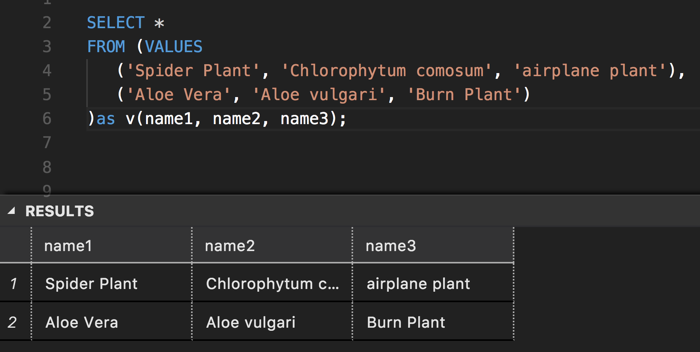
SELECT
    v.name1,
    v.name2,
    v.name3
FROM
(
    VALUES
        ('Spider Plant', 'Chlorophytum comosum', 'airplane plant'),
        ('Aloe Vera', 'Aloe vulgari', 'Burn Plant')
) AS v (name1, name2, name3);
GO
The folks who got this incorrect mostly went for 3: if you haven’t used these before, it’s unclear how those commas work!
Table value constructors allow you to specify multiple rows, each surrounded by (round parens). Look for those round parens to identify the rows.
SELECT
    v.name1,
    v2.name1
FROM
(
    VALUES
        ('Heart Leaf Philodendron'),
        ('Philodendron cordatum')
) AS v (name1)
CROSS APPLY
(
    VALUES
        ('green'),
        ('leafy')
) AS v2 (name1);
GO
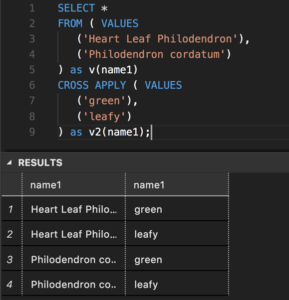
We have two table value constructors, and each of them has one column and two rows.
If you look at the execution plan for this query, it takes the datasets and joins them with an INNER JOIN with no join predicate: in this case it’s as if we did a cross join, and got the cartesian product. Each dataset has two rows, so 2 x 2 = 4.
SELECT
    v.thing,
    v2.thing
FROM
(
    VALUES
        ('Succulents'),
        ('Cacti')
) AS v (thing)
CROSS APPLY
(
    VALUES
        (v.thing + ' are friends')
) AS v2 (thing);
GO
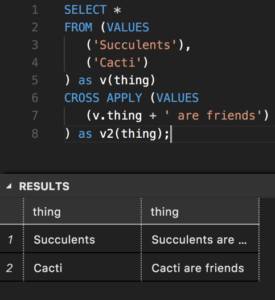
Whoo, the second table value constructor (v2) is doing something interesting this time: it’s referring to the dataset produced by the first table value constructor (v1), and concatenating on a literal value to the ’thing’ column.
The results here have two rows: the second TV creates an additional column.
SELECT
    v.plant,
    v2.faves
FROM
(
    VALUES
        ('Ferns', 'being spritzed', 'shade', 'humidity'),
        ('Succulents', 'well drained soil', 'to dry out a bit', 'brighter light')
) AS v (plant, fav1, fav2, fav3)
CROSS APPLY
(
    VALUES
        (fav1),
        (fav2),
        (fav3)
) AS v2 (faves);
GO
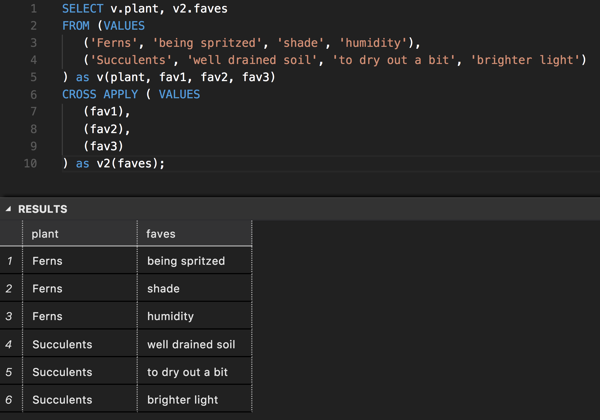
I find this to be a very interesting pattern: we are using a table value constructor to do an unpivot operation!
The first table value constructor (v), is a two row table with four columns: plant, fav1, fav2, and fav3.
The second table value constructor (v2), does something that seems almost impossible:
This is allowed, and it does work.
The number of rows we get back is the number of values in fav1, fav2, and fav3 - there are two rows and three columns, so 2 x 3 = 6 rows.



Copyright (c) 2025, Catalyze SQL, LLC; all rights reserved. Opinions expressed on this site are solely those of Kendra Little of Catalyze SQL, LLC. Content policy: Short excerpts of blog posts (3 sentences) may be republished, but longer excerpts and artwork cannot be shared without explicit permission.