
Why Won't PostgreSQL Use My Covering Index?
Dear Postgres, Why won’t you use my covering index?
Lately I’ve been learning to tune queries running against PostgreSQL, and it’s …
Read MoreBy Kendra Little on • 4 min read
I saw a question on Twitter today that took me down a little rabbit hole. And when I go down rabbit holes, I like to blog about it! There’s a TLDR at the bottom of this post if you’re short on time.
Grant Fritchey asked:
Simple parameterization on a trivial query with a WHERE clause. Supply a different value, new plan, also parameterized. The old plan was not reused.
I thought simple parameterization lead to plan reuse?
The thing about simple parameterization is that it’s not simple.
This is also known as auto-parameterization, and sometimes it’s not automatic – in other words, sometimes it looks like it happens, but it doesn’t actually happen.
In Klaus Aschenbrenner’s blog post, “The Pain of Simple Parameterization”, he wrote:
In general SQL Server only auto parameterizes your SQL statements if you deal with a so-called Safe Execution Plan: regardless of the provided input parameter values, the query must always lead to the same execution plan.
There are times when SQL Server just doesn’t think it’s safe to simply parameterize your query, and that can be SUPER confusing when you’re looking at queries.
I run two these two statements against the BabbyNames database…
SELECT
    FirstName
FROM ref.FirstName AS fn
WHERE fn.FirstNameId = 76682;
GO

SELECT
    FirstName
FROM ref.FirstName AS fn
WHERE fn.FirstNameId = 86055;
GO
In the actual execution plan, I see that the literal FirstNameId values have been replaced with @1.
Further, in the properties of the leftmost operator on the plan, I see that StatementParameterization type = 2.
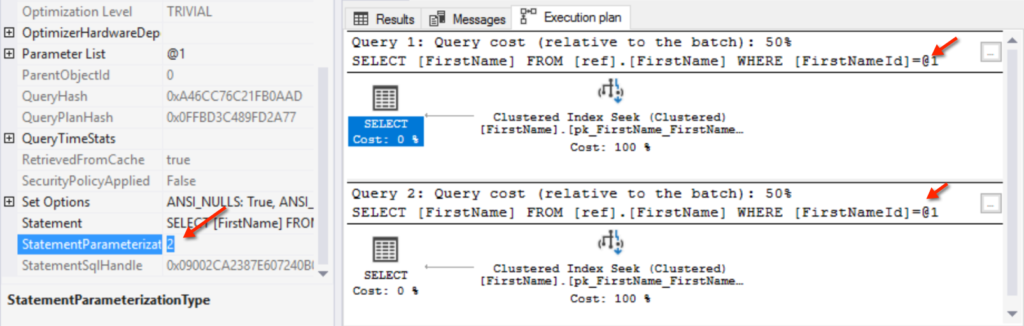
In Query Store and the plan cache, the text for my query gets recorded as:
(@1 integer)
SELECT
    FirstName
FROM ref.FirstName AS fn
WHERE fn.FirstNameId = @1;
That single plan is show as having two executions. In other words, it’s re-used.
Let’s change our query a little:
SELECT
    FirstNameId
FROM ref.FirstName AS fn
WHERE fn.FirstName = N'Grant';
GO

SELECT
    FirstNameId
FROM ref.FirstName AS fn
WHERE fn.FirstName = N'Kendra';
GO
When I run these new queries, here’s what my actual execution plan looks like:
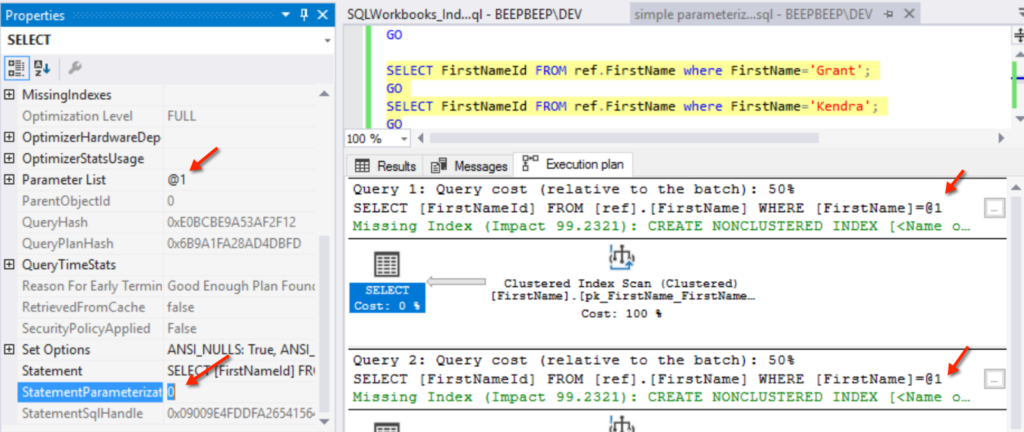
Hmmmm… this is different! I’ve got the @1 again in my query text, and it’s even in the parameter list on the left.
But notice that this time, StatementParameterizationType is 0.
Last time, that was set to 2!
If I look in Query Store and my query plan cache, I find two queries and two plans.
The queries are formatted differently, they look like this:
SELECT
    FirstNameId
FROM ref.FirstName AS fn
WHERE fn.FirstName = N'Grant';

SELECT
    FirstNameId
FROM ref.FirstName AS fn
WHERE fn.FirstName = N'Kendra';
The parameter didn’t make it in there at all.
Just because I see an @1 being substituted in for a literal value in that text hint at the top of a plan doesn’t mean that simple parameterization has actually happened.
And for the record, I’m not sure that this is the exact scenario Grant was asking about, because my second example here isn’t technically a ’trivial’ plan. But I do think that this is one of many reasons to use explicit parameterization practices, and not to rely on simple or auto-parameterization, because it just doesn’t work in many cases.
If you’d like to play around with these examples, the code is in this gist.
And thank you Grant for posting this question, I needed it to get me out of a blogging dry spell!



Copyright (c) 2025, Catalyze SQL, LLC; all rights reserved. Opinions expressed on this site are solely those of Kendra Little of Catalyze SQL, LLC. Content policy: Short excerpts of blog posts (3 sentences) may be republished, but longer excerpts and artwork cannot be shared without explicit permission.