How to See Rowcounts and Execution Time for In-Flight Queries in SQL Server
I frequently need to see rowcounts and execution time for queries while they’re running. Maybe I’m troubleshooting a slow query …
Read Moreon • 4 min read
One cool little feature in SQL Server 2016 is COMPRESS(). It’s a TSQL function available in all editions that shrinks down data using the GZIP algorithm (documentation).

Things to know about COMPRESS():
If you’d like to play with all the code, grab it from this gist.
Let’s say that we have a table with a ‘Notes’ style field. For most rows, ‘Notes’ is null. For the rows where it has data, sometimes it’s short, but sometimes it’s a super long set of characters.
My first step is to create two tables with 10 million rows each with a ‘Notes’ column. ‘Notes’ is null for most rows — but for 10K rows, it has varchar data in it ranging from 3 bytes to 29KB.
I generated ‘Notes’ data that compresses very well - I just used a repeating set of characters. The table has just one other column, so most of the size is in the ‘Notes’ column, so this results in a much smaller table.
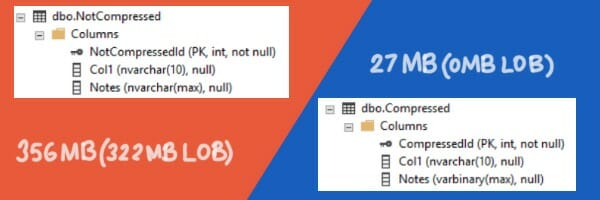
In the original table, the long character rows couldn’t fit on the in-row 8KB pages, so most of the ‘Notes’ column had to be stored on LOB pages (for the rows where it’s not null). My super-compressible rows are so small that they don’t have to go off-row: not only is my table much smaller, it doesn’t even have to use LOB pages.
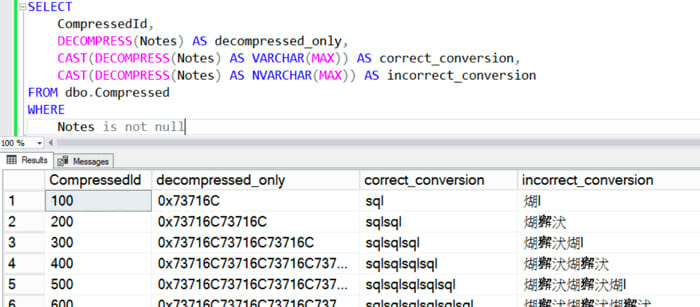
If you use COMPRESS(), you need to make sure you remember the data type that you used before compressing the data. You can get the data back with the DECOMPRESS() function, but to read it properly you have to convert it back into the original type.
In this case, I compressed VARCHAR data. Here’s what it looks like reading the data with just plain DECOMPRESS(), and DECOMPRESS() converted to VARCHAR and NVARCHAR.
In the documentation on COMPRESS(), it says, “Compressed data cannot be indexed.” That’s not 100% true, at least not according to my understanding of the word “indexed”.
It is true that COMPRESS() outputs a VARBINARY(max) column. This data type can’t be a key column in an index.
However, columns with this data type can be used in the filter of a filtered index in a way that may be interesting for cases like our ‘Notes’ column, where most of the rows have a NULL value for ‘Notes’ and the column is highly selective.
In this case, we might want to create a covering filtered index, like this:
CREATE INDEX ix_filtertest
on dbo.Compressed (CompressedId)
    INCLUDE (Notes)
WHERE (Notes IS NOT NULL);
GO
Using Notes as an included column does store another copy of it. But in the case of our ‘Notes’ column, the compressed column is all in-row data and is not particularly large.
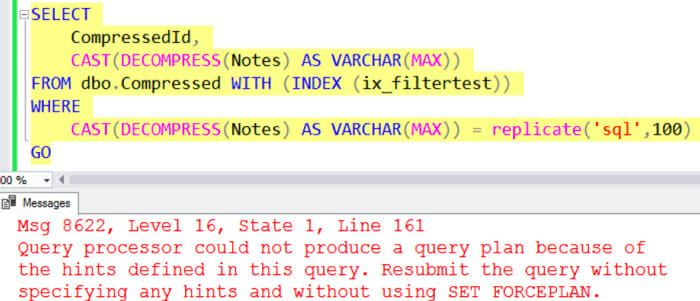
To get SQL Server to use this index, we may have to write our queries carefully, though. Just using the ‘Notes’ column in a predicate doesn’t do it:
Instead, we have to explicitly add a predicate to our query that matches the IS NOT NULL filter:
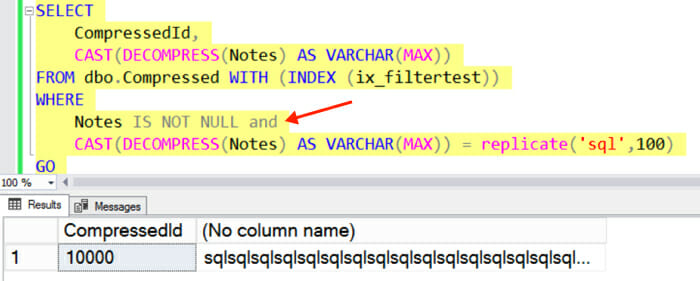
So it may be possible in some cases to use indexes with data generated with COMPRESS(), depending on what you want to do.



Copyright (c) 2025, Catalyze SQL, LLC; all rights reserved. Opinions expressed on this site are solely those of Kendra Little of Catalyze SQL, LLC. Content policy: Short excerpts of blog posts (3 sentences) may be republished, but longer excerpts and artwork cannot be shared without explicit permission.