
When Were Statistics Last Updated for a Heap?
I got a question last week from a very smart fellow:
How can I tell when statistics were last updated for a heap?
Before I could email him back, I …
Read Moreon • 9 min read
When I was recently working on the course, “Should Developers Manage Index Maintenance?” I explained that in my experience, statistics maintenance can make more of a difference to performance than index maintenance can.
I also noted that one of the big “maintenance goofs” that I’ve made in the past is to be overly eager to update statistics. And to update them with FULLSCAN.
Here’s some detail on why doing that can be so slow, and how it can eat up more resources than you might think. (This is a long one, so scroll on down to the end of the post for a list of spoilers, if you like.)
When people manually update statistics, they generally don’t update just a single column stats, or stats for a single index. They identify a table that’s a problem, and create a command to update stats against the whole table.
The command to update statistics against an entire table looks something like this:
UPDATE STATISTICS dbo.FirstNameByBirthDate_1966_2015;
GO
But then, if they’ve gone to this trouble, they think, “I should try to make the updated statistics as accurate as possible!”
The obvious way to do that it to tell SQL Server to do more than just take a sample of the data: instead to do it with FULLSCAN.
So they use a command like this:
UPDATE STATISTICS dbo.FirstNameByBirthDate_1966_2015 WITH FULLSCAN;
GO
On my test instance, the command that uses the default sampling takes 6 seconds to complete.
The command which adds “WITH FULLSCAN” takes just over five minutes to complete.
The reason is that those two little words can add a whole lot of extra IO to the work of updating statistics.
My table is pretty narrow. It has only six statistics on it: I queried information about them with a query like this.
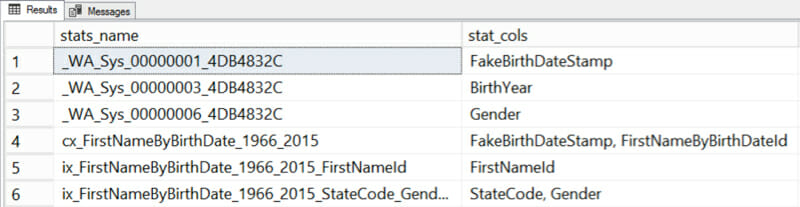
The three statistics with the funny names beginning in _WA_Sys are column statistics that SQL Server automatically created when I ran queries with joins or where clauses using those columns. The other three statistics were automatically created when I created indexes.
I ran a trace when I updated statistics with FULLSCAN, and here’s what I saw, stat by stat…
The clustered index has a two-column statistic. Those two columns match up with this query in the trace:
SELECT StatMan([SC0], [SC1]) FROM
(SELECT TOP 100 PERCENT [FirstNameByBirthDateId] AS [SC0], [FakeBirthDateStamp] AS [SC1] FROM [dbo].[FirstNameByBirthDate_1966_2015] WITH (READUNCOMMITTED)  ORDER BY [SC0], [SC1] )
AS _MS_UPDSTATS_TBL  OPTION (MAXDOP 4);
GO
Here’s the plan I saw in the trace:
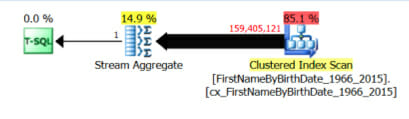
There are only two columns output from the clustered index scan: FirstNameByBirthDateId and FakeBirthDateStamp, the two columns needed to update the stat.
Next, SQL Server went to work on the FakeBirthDateStamp column statistic.
“But wait!” you might think. “We just got that info when updating the stat for the clustered index!”
Yes, we did. But we’re going to go scan something else, anyway, because that’s how we roll. We need to independently collect data for each statistic, even though you ran the command against the whole table.
Here’s the query that SQL Server runs next, which lines up with the column stat:
SELECT StatMan([SC0])
FROM (SELECT TOP 100 PERCENT [FakeBirthDateStamp] AS [SC0]
FROM [dbo].[FirstNameByBirthDate_1966_2015] WITH (READUNCOMMITTED)  ORDER BY [SC0] )
AS _MS_UPDSTATS_TBL  OPTION (MAXDOP 4);
GO
Here is the plan it used to get the data to update the column statistic:

This time, SQL Server chose to scan the nonclustered index on FirstNameId. Looking at the properties of the scan, it figured out that FakeBirthDateStamp would be there (because of the clustering key), and decided to scan this nonclustered index and output just that column:
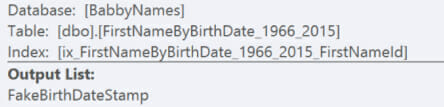
But … oops! We didn’t allocate enough memory for our sort and had a little spill in tempdb.
If you’re still reading, here’s where things get crazier than I expected.
BirthYear is a computed column. SQL Server uses the following query to gather data to update my column statistic…
SELECT StatMan([SC0])
FROM (SELECT TOP 100 PERCENT [BirthYear] AS [SC0]
FROM [dbo].[FirstNameByBirthDate_1966_2015] WITH (READUNCOMMITTED)
ORDER BY [SC0] ) AS _MS_UPDSTATS_TBL  OPTION (MAXDOP 4);
GO
And here’s the plan I got:

Here’s the play by play of what that plan is doing:
Computed columns can have statistics on them. That’s a good thing. I don’t have a non-clustered index on this column for SQL Server to scan, but I was surprised that it wanted to re-compute every single row for it, because I did mark this column as ‘persisted’ (I double-checked with a query).
But this time, SQL Server really didn’t want to scan that clustered index again (we just did it, after all), so it decided to recompute every. Single. Row.
We’re not done yet, though. We’re only halfway through the statistic!
We’ve scanned every row in the nonclustered index on FirstNameId twice already. But we haven’t actually updated its statistic yet, so… you guessed it, let’s scan it again!
The query to gather data to update this stat is…
SELECT StatMan([SC0], [SC1], [SC2])
FROM (SELECT TOP 100 PERCENT [FirstNameId] AS [SC0], [FirstNameByBirthDateId] AS [SC1], [FakeBirthDateStamp] AS [SC2]
FROM [dbo].[FirstNameByBirthDate_1966_2015] WITH (READUNCOMMITTED)
ORDER BY [SC0], [SC1], [SC2] ) AS _MS_UPDSTATS_TBL  OPTION (MAXDOP 4);
GO
And the plan was…
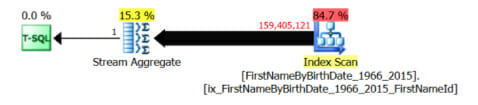
Look on the bright side: it may be the third time we’ve scanned this nonclustered index, but at least this time we didn’t have any tempdb spills.
We’ve got another nonclustered index, and it has two key columns. Those two columns are in the auto-generated index statistic. To gather information for them, SQL Server runs this query:
SELECT StatMan([SC0], [SC1], [SC2], [SC3])
FROM (SELECT TOP 100 PERCENT [StateCode] AS [SC0], [Gender] AS [SC1], [FirstNameByBirthDateId] AS [SC2], [FakeBirthDateStamp] AS [SC3]
FROM [dbo].[FirstNameByBirthDate_1966_2015] WITH (READUNCOMMITTED)  ORDER BY [SC0], [SC1], [SC2], [SC3] )
AS _MS_UPDSTATS_TBL  OPTION (MAXDOP 4);
GO
This gets a plan that scans the associated nonclustered index:

Whew, I’m glad this is a narrow table. We have a column statistic on Gender. This might look like a duplicate stat to the index statistic — but note that the index statistic leads on StateCode. That turns out to make it quite different (because only the leading column in a statistic gets information in the histogram). So the column statistic on Gender only is really quite different.
Again, SQL Server can’t re-use any of the information it previously scanned. It runs this query:
SELECT StatMan([SC0])
FROM (SELECT TOP 100 PERCENT [Gender] AS [SC0]
FROM [dbo].[FirstNameByBirthDate_1966_2015] WITH (READUNCOMMITTED)  ORDER BY [SC0] )
AS _MS_UPDSTATS_TBL  OPTION (MAXDOP 4);
GO
Which gets this execution plan:

Confession: this execution plan makes me a little sad. I knew I wasn’t going to get a happy ending for this post, but I was really rooting for it to at least scan the nonclustered index on StateCode and Gender (which is physically much smaller).
Nope. It decided to scan the whole clustered index, again, this time to output the Gender column. And it spilled 97K pages in tempdb.
I set up a quick and sloppy extended events trace to get the following events:
The query execution plan screenshots are from the free SentryOne Plan Explorer, taken with Snagit.
Here’s what you need to know:
This is because:
Who knew that so much weirdness could come from such a simple command?!?!?



Copyright (c) 2025, Catalyze SQL, LLC; all rights reserved. Opinions expressed on this site are solely those of Kendra Little of Catalyze SQL, LLC. Content policy: Short excerpts of blog posts (3 sentences) may be republished, but longer excerpts and artwork cannot be shared without explicit permission.