How to See Rowcounts and Execution Time for In-Flight Queries in SQL Server
I frequently need to see rowcounts and execution time for queries while they’re running. Maybe I’m troubleshooting a slow query …
Read Moreon • 6 min read
Trace Flag 4199 has been in SQL Server for a while. I’ve long thought of this as the “Bucket of Optimizer Hotfixes” trace flag: enabling it turns on a variety of hotfixes that have been implemented over the years.

When query tuning, I’ve often tested whether or not Trace Flag 4199 makes a difference to the query I’m tuning. Most of the time it doesn’t make a difference. I’ve had some rare occasions where it’s made a query faster. I’ve never personally found a case where enabling the flag slowed a query down.
One of the weird thing about the fixes under 4199 was that they never used to get merged into the mainstream codebase. The amount of things changed by the flag just kept growing. This was fixed in SQL Server 2016. If you’re using database compatibility level 130, all the fixes for prior SQL Server versions are enabled, and the optimizer will use them.
I think this is a great thing. Merging in those fixes makes understanding what 4199 does much less confusing – and Trace Flag 4199 is still being used for new fixes, too!
Trace Flag 4199 has a bit of baggage when it comes to implementation. Prior to SQL Server 2016, if you wanted to enable these optimizer hotfixes, you have three choices:
In SQL Server 2016 RTM, we got the option to enable Query Optimizer Hotfixes for a given database. This is great to have a finer-grained scope. You enable this for a database with the following code:
ALTER DATABASE SCOPED CONFIGURATION SET QUERY_OPTIMIZER_HOTFIXES = ON;
GO
Even better, in SQL Server 2016 SP1, we got the option to enable this for a given query in a hint, with code like this:
/* No sort here -- works same as DB setting (makes sense) */
SELECT IntCol
FROM dbo.LetsTalkAboutQueryOptimizerHotfixes
WHERE PartitioningCol < '2017-10-02'
ORDER BY PartitioningCol DESC, CharCol DESC
OPTION (USE HINT ('ENABLE_QUERY_OPTIMIZER_HOTFIXES'));
GO
This gets around that pesky high-permissions problem that the QUERYTRACEON hint uses. A couple of things to keep in mind:
Let’s say I have a few queries that get a performance boost from query optimizer hotfixes on SQL Server 2016. For whatever reason, I don’t choose the USE HINT route– I enable Query Optimizer Hotfixes at the database level.
Things are going fine, but when I’m tuning a slow query in that database, I wonder– would I get a different plan if I didn’t have Query Optimizer Hotfixes on?
But there isn’t a USE HINT option to disable query optimizer hotfixes just for my query.
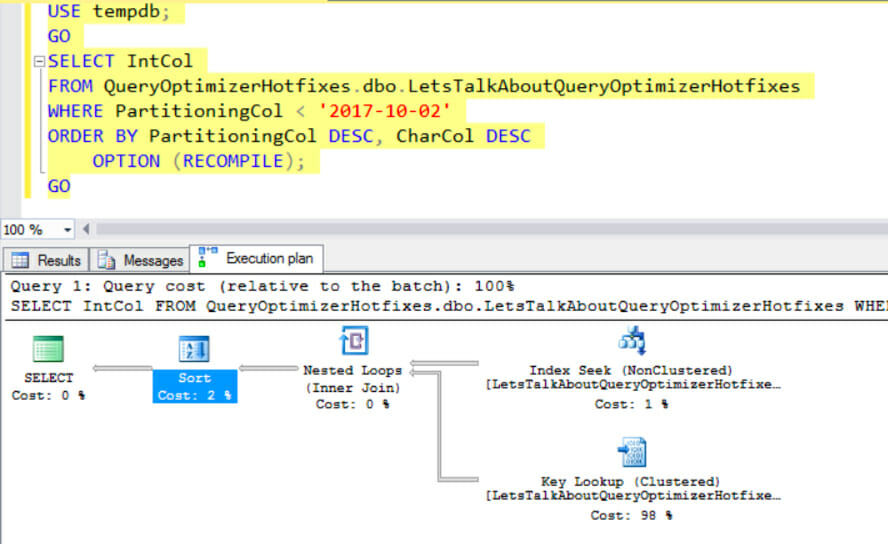
I have Jeremiah Peschka to thank for this simple solution: just use tempdb and compile your query against your database with three part names.
Since Query Optimizer Hotfxes is scoped to the database, using another database where the setting isn’t on to compile your query gives you a totally different plan, compiled with that database’s settings for query optimizer hotfixes.
To make sure this was as good as it sounded, I set up a repro for a bug fixed after SQL Server 2016 RTM which requires enabling TF4199 or QUERY_OPTIMIZER_HOTFIXES as part of the solution.
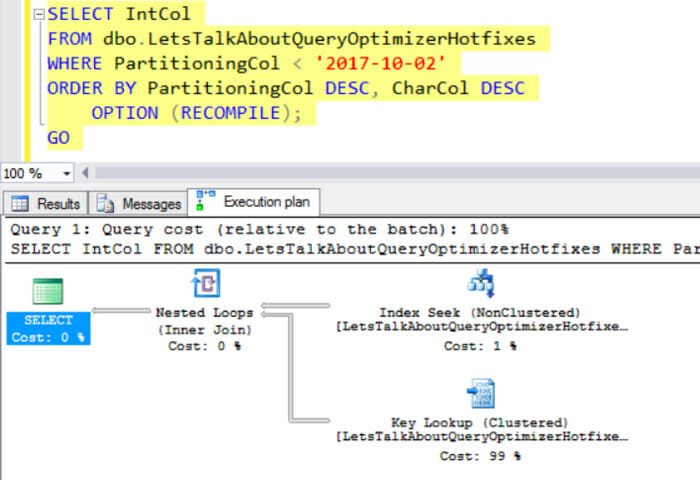
This bug impacts partitioned tables that have only a single partition. The bug is that the optimizer inserts a SORT operator into the plan without realizing that the index it’s using provides the sorting.
I’ve enabled QUERY_OPTIMIZER_HOTFIXES at the database level, and here’s how my query plan looks… the bug is fixed:
But what would my plan look like with Query Optimizer Hotfixes off? When I compile the query from tempdb (which doesn’t have the setting enabled) using three part naming, the bug is there and the plan has a SORT operator:
Let’s say you’ve got a very large database, and you want to do a side-by-side testing some code – one version with query optimizer hotfixes on, one with it off. But the database is so large that restoring two copies isn’t so attractive.
You can create a second, empty database, and create copies of your stored procedures or views that use three part names to access the tables in your primary database. Then you can enable or disable Query Optimizer hotfixes at the database scope in either database, and it’s easy to compare.
I think this is mostly an interesting option for testing more than production code. That’s just because in production code, if you want to selectively implement this, then the USE HINT option seems simpler.
But it’s always nice to have options!
Grab the code to repro these execution plans from this Gist.
Remember that you need to be running SQL Server 2016 for this to work, and you need SP1 if you’d like to play around with OPTION (USE HINT (‘ENABLE_QUERY_OPTIMIZER_HOTFIXES’)).



Copyright (c) 2025, Catalyze SQL, LLC; all rights reserved. Opinions expressed on this site are solely those of Kendra Little of Catalyze SQL, LLC. Content policy: Short excerpts of blog posts (3 sentences) may be republished, but longer excerpts and artwork cannot be shared without explicit permission.