Why Won't PostgreSQL Use My Covering Index?
Dear Postgres, Why won’t you use my covering index?
Lately I’ve been learning to tune queries running against PostgreSQL, and it’s …
Read MoreBy Kendra Little on • 4 min read
You can’t do everything with a columnstore index – but SQL Server’s optimizer can get pretty creative so it can use a columnstore index in ways you might not expect.
If you try to create a nonclustered columnstore index on a computed column, you’ll get error message 35307:
Msg 35307, Level 16, State 1, Line 270
The statement failed because column ‘BirthYear’ on table ‘FirstNameByBirthDate_1976_2015’ is a computed column. Columnstore index cannot include a computed column implicitly or explicitly.
I went ahead and created a nonclustered columnstore index on the other columns in my table, like this:
CREATE NONCLUSTERED COLUMNSTORE INDEX col_dbo_FirstNameByBirthDate_1976_2015
    on dbo.FirstNameByBirthDate_1976_2015
    ( FakeBirthDateStamp, FirstNameByBirthDateId, FirstNameId, Gender);
GO
Then I ran this query against the table, which groups rows by the computed column, BirthYear:
SELECT TOP 3
    BirthYear,
    COUNT(*) as NameCount
FROM dbo.FirstNameByBirthDate_1976_2015
WHERE BirthYear BETWEEN 2001 and 2015
GROUP BY
    BirthYear
ORDER BY COUNT(*) DESC;
GO
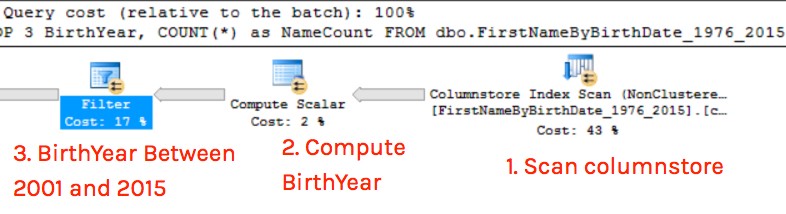
Looking at the execution plan, SQL Server decided to scan the non-clustered columnstore index, even though it doesn’t contain the computed column BirthYear! This surprised me, because I have a plain old non-clustered index on BirthYear which covers the query as well. I guess the optimizer is really excited about that nonclustered columnstore.

The columnstore index isn’t the best choice for this query:
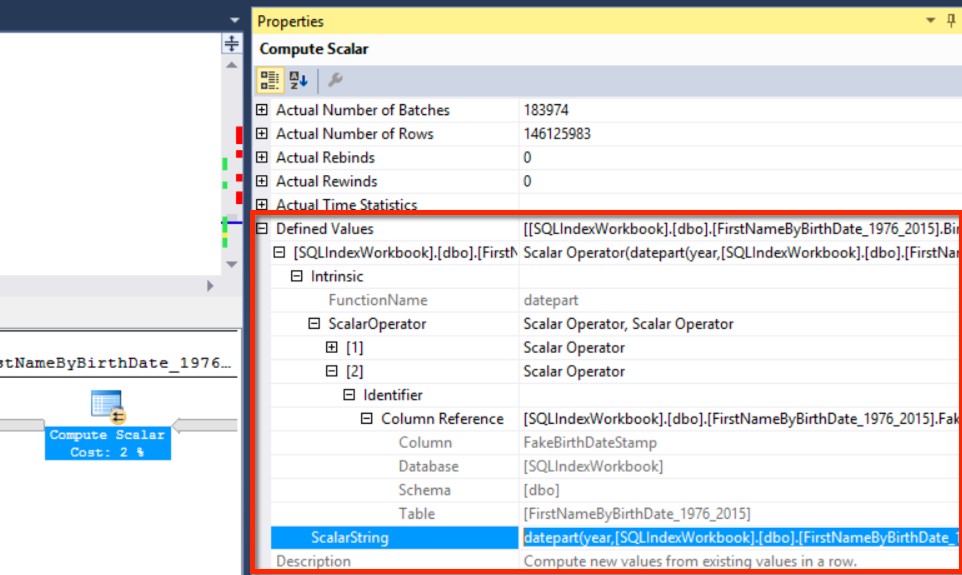
Clicking on that compute scalar operator and looking at the properties window, we can see that SQL Server looked up the definition for the computed column, and figured out that the computation is based on columns in our nonclustered index– so it could scan that index, then run the computation for each row.
SQL Server is waiting until the third operator, a filter, to filter out the rows for BirthYear between 2001 and 2015:
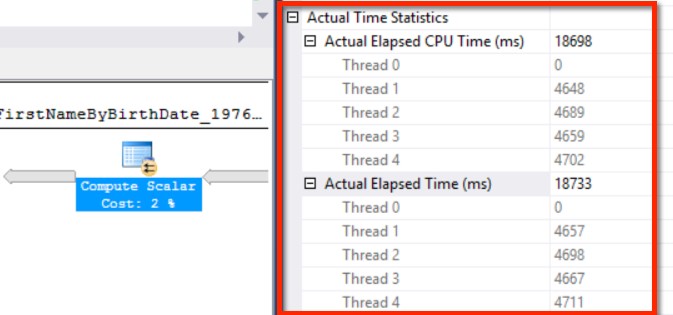
This is an actual execution plan, so I have Actual Time Statistics, and I can see exactly how much CPU was burned to compute BirthYear for every row. Scrolling up in the properties window, I find that this took almost five seconds for each thread that worked on the compute scalar. That’s more than 80% of the query’s duration just to figure out BirthYear.
Oops!
My original query has the predicate, BirthYear BETWEEN 2001 and 2015. Let’s change that predicate to a non-computed column:
SELECT TOP 3
    BirthYear,
    COUNT(*) as NameCount
FROM dbo.FirstNameByBirthDate_1976_2015
WHERE FakeBirthDateStamp >= CAST('2001-01-01' AS DATETIME2(0))
    and FakeBirthDateStamp < CAST('2016-01-01' AS DATETIME2(0))
GROUP BY
    BirthYear
ORDER BY COUNT(*) DESC;
GO
I’m still using the computed column BirthYear in my SELECT and GROUP BY.
SQL Server still chooses the columnstore index for this query, but now there is a predicate on the columnstore index scan itself:
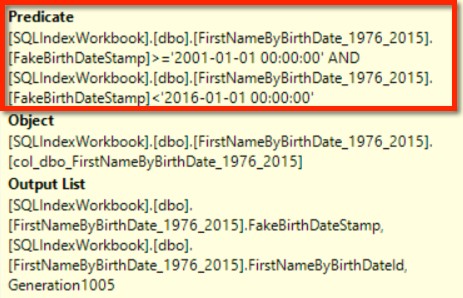
This means far fewer rows are flowing into the compute scalar operator – we don’t have to calculate BirthYear for any of the rows from 1976 through the end of 2000.
Making this change to the query text makes our nonclustered columnstore index highly competitive with Ye Olde covering rowstore b-tree index:
If we couldn’t re-write the predicate easily for whatever reason, we might choose to keep the non-clustered rowstore index on BirthYear around and use OPTION (IGNORE_NONCLUSTERED_COLUMNSTORE_INDEX) in our query.
I had assumed the optimizer would be reluctant to create a plan for a computed column, since that column can’t be in the columnstore index. But it turned out to be pretty eager to do it.
If you’ve got computed columns and are testing out columnstore, look carefully at your queries and check to make sure you don’t have any super-expensive compute scalar operators showing up in your plans where you might not want them.
Wouldn’t this all be easier if you could just put the computed column in the columnstore, anyway? Vote up this Connect item.



Copyright (c) 2025, Catalyze SQL, LLC; all rights reserved. Opinions expressed on this site are solely those of Kendra Little of Catalyze SQL, LLC. Content policy: Short excerpts of blog posts (3 sentences) may be republished, but longer excerpts and artwork cannot be shared without explicit permission.