
Why Won't PostgreSQL Use My Covering Index?
Dear Postgres, Why won’t you use my covering index?
Lately I’ve been learning to tune queries running against PostgreSQL, and it’s …
Read Moreon • 4 min read
Update, 6/21/2016: Be careful using indirect checkpoint with failover clusters if your SQL Server 2014 instance is not fully patched. See KB 3166902. This bug was fixed in SQL Server 2016 prior to RTM.
SQL Server 2016 introduces big new features, but it also includes small improvements as well. Many of these features are described in the “It Just Runs Faster” series of blog posts by Bob Ward and Bob Dorr.

One article in this series explained that new databases created in SQL Server 2016 will use “Indirect Checkpoint” by default. Indirect checkpoint was added in SQL Server 2012, but has not previously been enabled by default for new databases. The article emphasizes this point:
Indirect checkpoint is the recommended configuration, especially on systems with large memory footprints and default for databases created in SQL Server 2016.
Head over and read the article to learn how indirect checkpoint works.
When you create a new database in SQL Server 2016, if you use the GUI and click on the ‘Options’ tab, you can see the “Target Recovery Time (seconds)” in the Recovery section is set to 60.
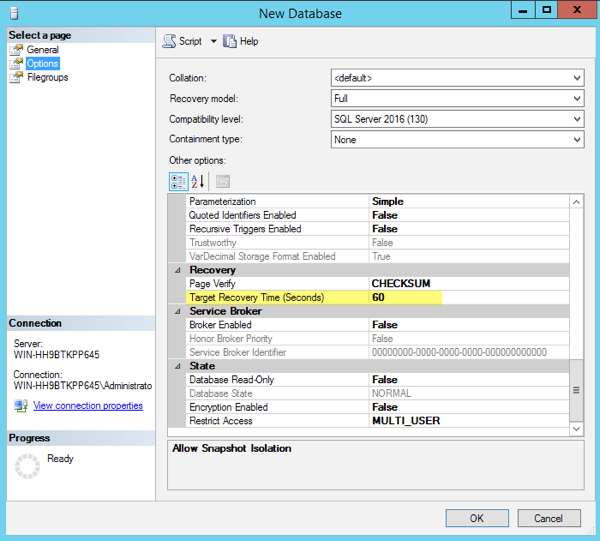
This value is inherited from the model database, so if you don’t choose to use this as the default for your new databases, you can change it there. You can also turn this on for individual databases in SQL Server 2012, 2014, and databases restored to 2016.
You can see the settings for existing databases with this query…
SELECT name, target_recovery_time_in_seconds
FROM sys.databases;
If the target recovery time is set to 0, that means the database uses automatic checkpoints (not the newer indirect feature).
Nope. Not unless you’ve changed “recovery interval (min)” in your server configuration settings. Check your current setting with this query…
SELECT name, value, value_in_use
FROM sys.configurations
WHERE name = 'recovery interval (min)';
If your value of ‘recovery interval (min)’ is set to zero, that means automatic checkpoints are typically occurring every minute (source).
Setting Target Recovery Time (Seconds) to 60 at the database level maintains the same checkpoint interval, but uses the indirect checkpoint algorithm.
Yes. Things can go wrong with any configuration, and every setting can have bugs.
If you’re using indirect checkpoint with a failover cluster on SQL Server 2014, make sure to test and apply recent cumulative updates. On June 21, 2016, Microsoft released KB 3166902.
This KB is a pretty serious one: “FIX: logs are missing after multiple failovers in a SQL Server 2014 failover cluster”. When log records are missing, SQL Server can’t recover the database properly – read the error message carefully in the KB and note that it says:
Restore the database from a full backup, or repair the database.
I verified from the team at Microsoft that this bug was fixed in SQL Server 2016 prior to RTM, so no need to wait for a patch.
In June 2016, Microsoft released a series of Cumulative Updates for SQL Server 2012 and 2014 that recommend using Trace Flag 3449 and indirect checkpoint on servers with 2+ terabytes of memory to speed up creating new databases. See KB 3158396 for details.
Mike Ruthruff wrote an excellent blog on the SQL Server Customer Advisory Team blog comparing performance with automatic checkpoint across several SQL Server versions with Indirect Checkpoint on SQL Server 2016.
He shows how average disk write latency was lower with indirect checkpoint on the system in question, and the meaning of the “Checkpoint Pages / sec” counter (automatic checkpoints) and “Background Writer Pages/sec” counter (indirect checkpoints). Read the post here.



Copyright (c) 2025, Catalyze SQL, LLC; all rights reserved. Opinions expressed on this site are solely those of Kendra Little of Catalyze SQL, LLC. Content policy: Short excerpts of blog posts (3 sentences) may be republished, but longer excerpts and artwork cannot be shared without explicit permission.