
Why Won't PostgreSQL Use My Covering Index?
Dear Postgres, Why won’t you use my covering index?
Lately I’ve been learning to tune queries running against PostgreSQL, and it’s …
Read Moreon • 4 min read
SQL Server’s really clever about a lot of things. It’s not super clever about YEAR() when it comes to indexes, even using SQL Server 2016 – but you can either make your TSQL more clever, or work around it with computed columns.

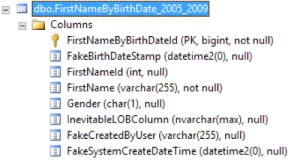
I’ve created a table named dbo.FirstNameByBirthDate_2005_2009 in the SQLIndexWorkbook database. I’ve taken the history of names by year, and made them into a fake fact table– as if a row was inserted every time a baby was born. The table looks like this:
I want to count the females born in 2006. The most natural way to write this query is:
SELECT
    COUNT(*)
FROM dbo.FirstNameByBirthDate_2005_2009
WHERE
    Gender = 'F'
    AND YEAR(FakeBirthDateStamp) = 2006
GO
Pretty simple, right?
This looks like it’d be a really great index for the query:
CREATE INDEX ix_women
    ON dbo.FirstNameByBirthDate_2005_2009
        (Gender, FakeBirthDateStamp);
GO
All rows are sorted in the index by Gender, so we can immediately seek to the ‘F’ rows. The next column is a datetime2 column, and sorting the rows by date will put all the 2006 rows together. That seems seekable as well. Right? Right.
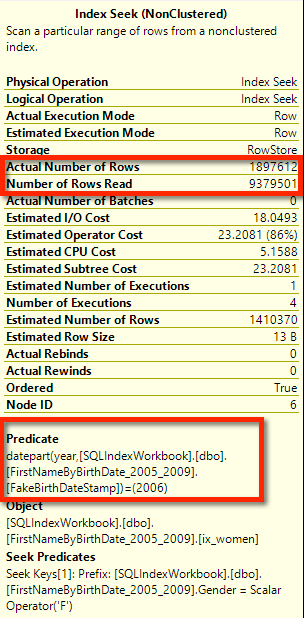
After creating our index, here’s the actual execution plan. At first, it looks like it worked. There’s a seek at the very right of this plan!

But if we hover over that index seek, we can see in the tooltip that there’s a hidden predicate that is NOT a seek predicate. This is a hidden filter. And because this is SQL Server 2016, we can see “Number of Rows Read” – it had to read 9.3 million rows to count 1.9 million rows. It didn’t realize the 2006 rows were together– it checked all the females and examined the FakeBirthDateStamp column for each row.
We can make this better with a simple query change. Let’s explain to the optimizer, in detail, what we mean by 2006, like this:
SELECT
	COUNT(*)
FROM dbo.FirstNameByBirthDate_2005_2009
WHERE
	Gender = 'F'
	AND FakeBirthDateStamp >= CAST('1/1/2006' AS DATETIME2(0))
		and FakeBirthDateStamp < CAST('1/1/2007' AS DATETIME2(0))
GO
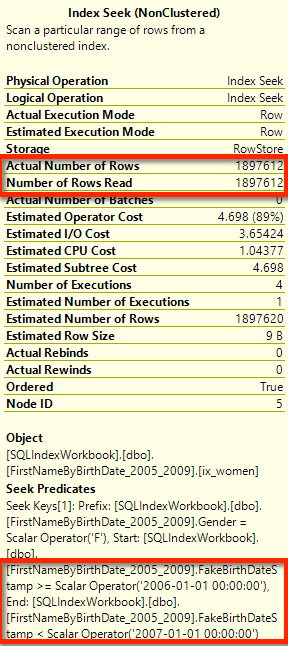
Our actual execution plan looks the same from the outer shape. We still have a seek, but the relative cost of it has gone up from 86% to 89%. Hm. Did it get worse?

Hovering over the index seek, the tooltip tells that it got much better. We have two seek predicates, and we only needed to read the rows that we actually counted. Way more efficient!
What if you can’t change the code? There’s a really cool optimization with computed columns that can help.
First, I’m going to add a column to my table called BirthYear, which uses the YEAR() function, like this:
ALTER TABLE dbo.FirstNameByBirthDate_2005_2009
    ADD BirthYear AS YEAR(FakeBirthDateStamp);
GO
Then I’m going to index BirthYear and Gender:
CREATE INDEX ix_BirthYear on dbo.FirstNameByBirthDate_2005_2009 (BirthYear, Gender);
GO
Now here’s the really cool part of the trick. I don’t have to change my code at all to take advantage of the BirthYear column. I’m going to run the same old query that uses the year function. (Here it is, just to be clear.)
SELECT
    COUNT(*)
FROM dbo.FirstNameByBirthDate_2005_2009
WHERE
    Gender = 'F'
    AND YEAR(FakeBirthDateStamp) = 2006
GO
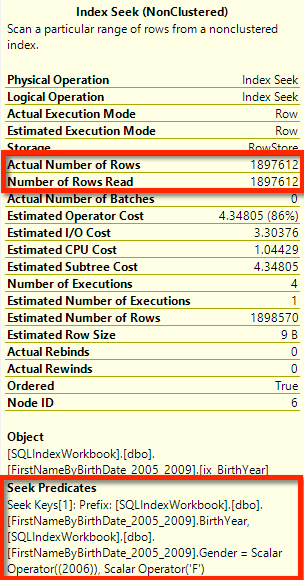
SQL Server auto-magically matches YEAR(FakeBirthDateStamp) to my computed column, and figures out it can use the index. It does a beautiful seek, every bit as efficient as if I’d rewritten the code:
When considering indexed computed columns:
This issue isn’t specific to the DATETIME2 data type. It still happens with good old DATETIME as well.
My tests were all run against SQL Server 2016 CTP3.3.
There’s three main things to remember here:



Copyright (c) 2025, Catalyze SQL, LLC; all rights reserved. Opinions expressed on this site are solely those of Kendra Little of Catalyze SQL, LLC. Content policy: Short excerpts of blog posts (3 sentences) may be republished, but longer excerpts and artwork cannot be shared without explicit permission.