
How to See Rowcounts and Execution Time for In-Flight Queries in SQL Server
I frequently need to see rowcounts and execution time for queries while they’re running. Maybe I’m troubleshooting a slow query …
Read Moreon • 2 min read
Patching isn’t fun. It’s time consuming, thankless, and easy to break stuff.
But you can’t skip it. For critical systems, you need to subscribe to patch lists for SQL Server and review issues that are fixed regularly.

Here’s an example of a SQL Server fix that came out this week.
Read the details of the fix first here.
Unpacking the KB:
Well, then. Incorrect results is kind of a big deal.
Well, it’s hard to say. Tempdb spills are fairly common– all you need is a sort or a memory-requiring join where the optimizer underestimated significantly how much data it had to work with. With plan re-use, estimation problems in optimization, and increasing data sizes, I believe 4GB spills are probably not uncommon.
And because the query doesn’t fail, this is super hard to monitor for.
Use this link to subscribe to the RSS feed: Most Recent SQL Server KBs
For mission critical data, you should have a release cycle for SQL Server version updates that includes development, test or pre-production, and finally a staggered release to production – just like any other code change.
It’s a dirty job, but someone really has to do it.
On the topic of spills and extents, I noticed a cool new perk in SQL Server 2016. We’re getting TONS of new information in actual plans if a tempdb spill occurred! Look at this:
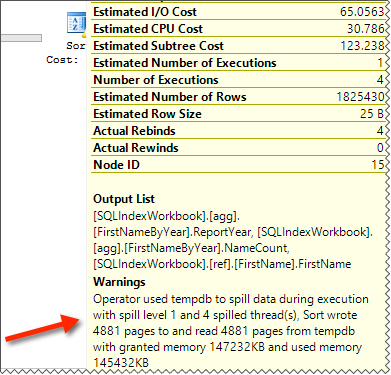
Very cool to be getting improved tools for tuning in the area of spills.



Copyright (c) 2025, Catalyze SQL, LLC; all rights reserved. Opinions expressed on this site are solely those of Kendra Little of Catalyze SQL, LLC. Content policy: Short excerpts of blog posts (3 sentences) may be republished, but longer excerpts and artwork cannot be shared without explicit permission.