100 Things I Hate About Views: Undeclared Data Types in Columns
Views let you do dumb things by accident in SQL Server. Then they make you have to think way too hard to fix them.
Read Moreon • 4 min read
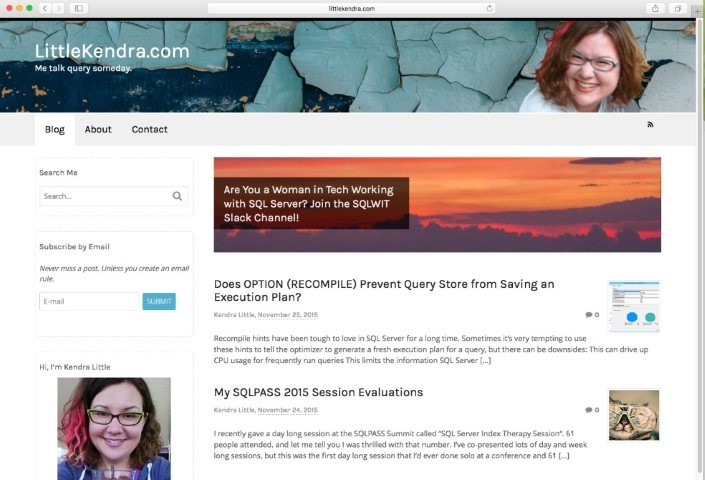
I recently gave LittleKendra.com a bit of a refresh. I wanted the website to be colorful, personal, and approachable.
Like most database people, I’m no professional designer. Working on my website consists mostly of 25% trying new things, and 75% undoing whatever I just did or figuring out how to simplify something.
After all that smearing paint on the internet wall, here’s what I’m using for the current site.
I’m using Canvas theme by WooThemes ($99). I’ve been using this for a few years, but I needed to update the theme to get the latest features and spend a lot of time experimenting with different layouts until I really liked it.
The great thing about Canvas it’s really flexible. And the bad thing about Canvas is that it has 999 configuration options to make it really flexible! But Canvas has been around long enough that it’s pretty robust and there’s lots of Q&A about it around the web.
Canvas tweaks for new header (added Jan 2016). These posts have been very helpful for customizing my header and footer:
Fonts are really difficult to choose. I think I spent at least 3 hours total experimenting with several fonts over the course of a few weekends. The fonts you like at first are not the fonts you want to live with!
I’m using Karla for headers and Open Sans for body text.
I needed some images with color and texture for the site header background and for featured images for some posts. Unsplash.com is a terrific resources for this stuff. I have no idea why chipped, textured blue paint on a wall speaks to me, but it really does – there’s something about the beauty and imperfection of it that made it just right for the site right now.
I use MailChimp’s RSS template for RSS Emails. Canvas makes it easy to do a simple subscription form like you see here on the site, but there’s other ways to set it up if you’re using a different template. MailChimp is free for small lists. This is super simple to set up, read the KB here.
I tested out ChimpFeedr for image resizing for the RSS feed, but ended up ditching it and deciding to just only post images that are 600px wide or smaller. (I learned that it’s really easy to resize images with Snagit, which I already have licensed.) If you’d rather use ChimpFeedr, read how to set it up here.
Updates 2016-01-05:
I’m using the WP to Twitter plugin to auto-tweet when posts go live. It was very simple to install and configure and has the option to shorten URLs.
Because backups matter for websites, too.
These work great with Wordpress to help make sure your site is being crawled and indexed by the major search engines.
The Jetpack plugin from Wordpress.com does a whole host of things– prevent brute force attacks, add sharing links, and allow readers to subscribe to comments on individual posts.



Copyright (c) 2025, Catalyze SQL, LLC; all rights reserved. Opinions expressed on this site are solely those of Kendra Little of Catalyze SQL, LLC. Content policy: Short excerpts of blog posts (3 sentences) may be republished, but longer excerpts and artwork cannot be shared without explicit permission.