
Msg 195: STRING_SPLIT Is Not a Recognized Built-In Function Name
Yesterday, I was writing some Transact SQL to dust off the cobwebs. I got confused when I was playing around with the STRING_SPLIT function, and kept …
Read MoreBy Kendra Little on • 4 min read
Here’s a little TSQL snack. I picked this up in a presentation by Itzik Ben-Gan at the PNWSQL user group recently, and it’s become a fast favorite.

But wait, there’s more! You can also use APPLY to perform calculations and simplify your query syntax– this is because the APPLY operator allows you to express a calculation that can be referred to:
This is really helpful, because you can’t refer to the results of a computation in one column from anywhere but the ORDER BY. This is because of the order of evaluation of parts of the statement.
I know this sounds confusing. It’ll make more sense in an example.
Here is a query written for the AdventureWorks sample database. There’s all sorts of examples that are possible for this, but I decided to go with one grouping data by month, using my favorite formula to round dates.
It shows the total quantity of orders by Product for an entire order month, for orders placed on or after 2004-07-01.
SELECT  DATEADD(MM, DATEDIFF(MM, 0, oh.OrderDate), 0) AS OrderDateMonth,
        p.Name AS ProductName,
        SUM(orderQty) AS totalQuantity
FROM    sales.SalesOrderHeader oh
JOIN    Sales.SalesOrderDetail od
        ON oh.SalesOrderID = od.SalesOrderID
JOIN    production.Product p
        ON od.ProductID = p.ProductID
WHERE   oh.OrderDate >= '2004-07-01'
GROUP BY DATEADD(MM, DATEDIFF(MM, 0, oh.OrderDate), 0),
        p.Name
ORDER BY OrderDateMonth,
        p.Name
Notice that to group the date at the month level, we need to include the calculation in the column in the column list, as well as in the group by clause.
This can be rewritten with CROSS apply to move the calculation into the JOIN area and only specify it once.
The benefits: this will simplify your syntax and reduce the chance of typos and errors, particularly when you need to go in and change the calculation. In cases when you’re displaying a sum in one column and showing a percentage using it in another column, this trick is *fantastic*. (Query numbers from the DMVs a lot? you’ll love this.)
Here, the calculation on the date is moved into the cross apply. It can be referenced as oh1.OrderDateMonth in both the list of columns, and in the GROUP BY portion of the query without rewriting the calculation.
SELECT  oh1.OrderDateMonth,
        p.Name AS ProductName,
        SUM(orderQty) AS totalQuantity
FROM    sales.SalesOrderHeader oh
CROSS APPLY ( SELECT    DATEADD(MM, DATEDIFF(MM, 0, oh.OrderDate), 0) AS OrderDateMonth ) AS oh1
JOIN    Sales.SalesOrderDetail od
        ON oh.SalesOrderID = od.SalesOrderID
JOIN    production.Product p
        ON od.ProductID = p.ProductID
WHERE   oh.OrderDate >= '2004-07-01'
GROUP BY oh1.OrderDateMonth,
        p.Name
ORDER BY OrderDateMonth,
        p.Name
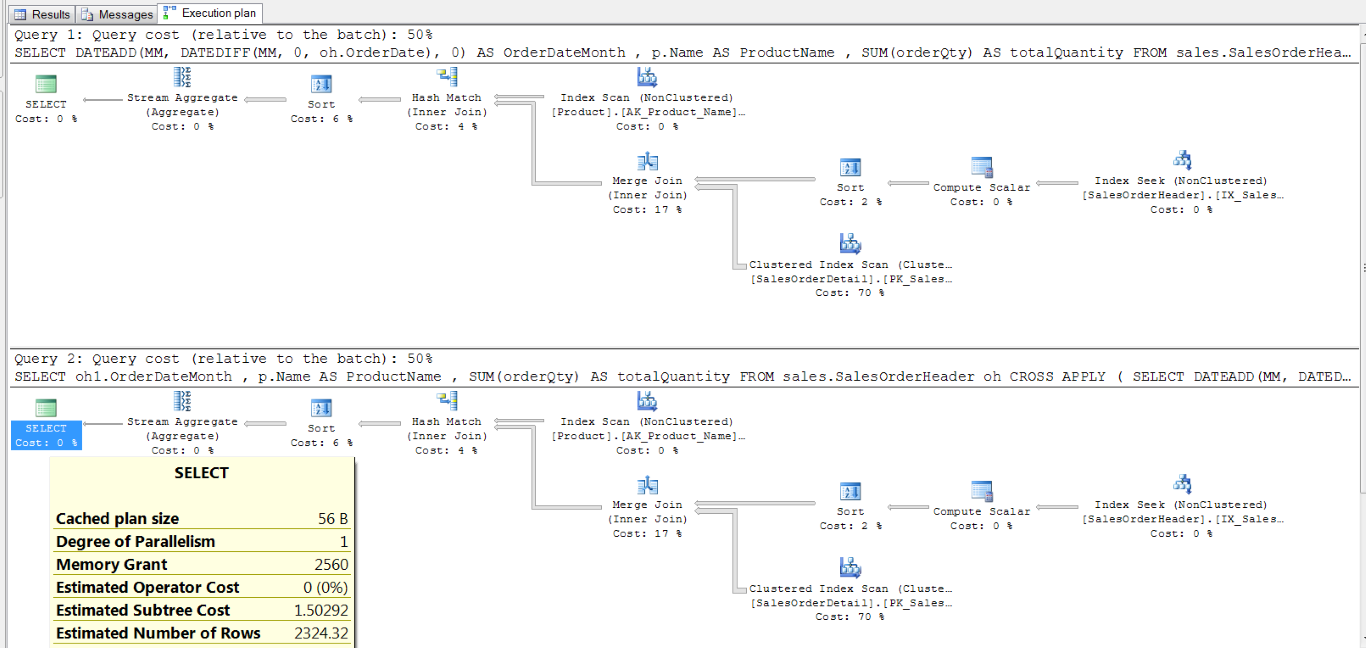
The execution plan for these two queries are identical.
In this case, the optimizer looks at these two queries and realizes the activities it needs to do will be the same.
You can create further CROSS APPLY or OUTER APPLY joins that refer to computations in prior joins.
You can also refer to the resulting computation in the where clause.
As with anything, you want to make sure you’re getting a good execution plan, and not shooting yourself in the foot with a new trick.
One big area to watch: although you can refer to these computations conveniently in the WHERE clause, you still want to be careful you’re using appropriate criteria.
For instance, if we were to change the example above to refer to the result from the CROSS APPLY oh1 in the where clause like this:
SELECT  oh1.OrderDateMonth ,
        p.Name AS ProductName ,
        SUM(orderQty) AS totalQuantity
FROM    sales.SalesOrderHeader oh
CROSS APPLY ( SELECT    DATEADD(MM, DATEDIFF(MM, 0, oh.OrderDate), 0) AS OrderDateMonth ) AS oh1
JOIN    Sales.SalesOrderDetail od
        ON oh.SalesOrderID = od.SalesOrderID
JOIN    production.Product p
        ON od.ProductID = p.ProductID
WHERE   oh1.OrderDateMonth >= '2004-07-01'  ---Don't do this!
GROUP BY oh1.OrderDateMonth ,
        p.Name
ORDER BY OrderDateMonth ,
        p.Name
… then in this case the query would not be able to use an index on OrderDate on the sales.SalesOrderHeader table, if one exists.
This is not specifically because of the CROSS APPLY, but because we are forcing SQL Server to apply the functions to every value to identify if it satisfies the criteria. That prevents a seek.



Copyright (c) 2025, Catalyze SQL, LLC; all rights reserved. Opinions expressed on this site are solely those of Kendra Little of Catalyze SQL, LLC. Content policy: Short excerpts of blog posts (3 sentences) may be republished, but longer excerpts and artwork cannot be shared without explicit permission.